Platform
From a sensor on the wall to an alert in your hand.
VexaOs is four layers that work as one system: sensors, gateway, cloud and apps. Here is what each one does, and what happens to a reading along the way.
Step 1
- Nine sensor families
- Bluetooth sensors and Wi-Fi smart plugs live today
- Wired RS-485 / Modbus via integration
Step 2
- Keeps readings through outages
- Alarm rules checked on site
- Recovers by itself
Step 3
- Drift and forecasts
- Plain-English findings
- Energy cost from your own prices
The journey of a reading
What happens, step by step.
- 1
A sensor takes a reading
Battery-powered sensors broadcast temperature, humidity or door state over Bluetooth Low Energy every few seconds. Smart plugs report over Wi-Fi. Wired RS-485 / Modbus devices join through an integration.
- 2
The gateway hears it
The VexaOs Edge Gateway picks up every sensor in range, decodes it through the adapter for that sensor type, and converts it to one common format.
- 3
Rules are checked on site
Alarm rules run on the gateway itself. A crossed limit or a door event is sent straight away, ahead of everything else in the queue.
- 4
Summaries go to the cloud
By default the gateway sends a summary per sensor every 10 seconds: minimum, maximum, average and latest. The interval can be set per sensor.
- 5
The cloud looks for trouble
VexaOs Cloud stores the history and checks every sensor for drift, forecasts, unusual door activity, low batteries and silent devices.
- 6
You see it and act
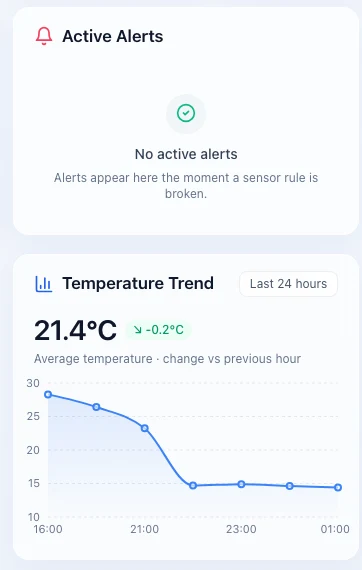
Dashboards update live on web, iOS and Android, and alerts reach your phone. Alerts can be acknowledged and resolved, with a record of who did what.
Sensor families
What the platform can listen to.
Nine families of sensor, wireless and wired, on one platform. Green is working today; the rest we add through adapters.
- Available now
Environment
BLE (Bluetooth Low Energy (wireless))Know the conditions in every room.
- Temperature (Available now)
- Humidity (Available now)
- Barometric pressure (Available now)
- +3 more
- Available now
Cold chain & food safety
BLE (Bluetooth Low Energy (wireless))Catch a warming cooler before the stock is lost.
- Cooler and freezer air temperature (Available now)
- Cooler door left ajar (Available now)
- Temperature logs with CSV export (Available now)
- +2 more
- Available now
Access & occupancy
BLE (Bluetooth Low Energy (wireless))See what opened, when, and for how long.
- Door and window contact (Available now)
- Movement and tilt of the sensor (Available now)
- Motion (PIR) (Via integration)
- +2 more
- Via integration
Water & leak
BLE (Bluetooth Low Energy (wireless))RS-485 (RS-485 / Modbus (wired))Find the leak while it is still a puddle.
- Leak and flood spots (Via integration)
- Water flow and usage (Via integration)
- Tank and level (Via integration)
- Being integrated
Machine health
BLE (Bluetooth Low Energy (wireless))RS-485 (RS-485 / Modbus (wired))Spot a failing machine by how it runs.
- Vibration: velocity, displacement, frequency (Being integrated)
- Bearing and motor temperature (Being integrated)
- Tilt and orientation (Being integrated)
- +2 more
- Via integration
Industrial process
RS-485 (RS-485 / Modbus (wired))Bring the instruments you already have onto one screen.
- Pressure transmitters (Via integration)
- Flow meters (Via integration)
- Tank and vessel level (Via integration)
- +2 more
- Available now
Energy
Wi-Fi (Wi-Fi (wireless))RS-485 (RS-485 / Modbus (wired))Know what is running and what it costs you.
- Smart-plug power (W) and energy (kWh) (Available now)
- Cost with seasonal and time-of-use pricing (Available now)
- Standby-draw detection (Available now)
- +2 more
- Via integration
Assets & tracking
BLE (Bluetooth Low Energy (wireless))Know which gateway last heard your equipment.
- Bluetooth asset tags and beacons (Via integration)
- Last-seen location (Via integration)
- In transit, with the Mobile Gateway (coming soon) (Via integration)
- Via integration
Safety
BLE (Bluetooth Low Energy (wireless))RS-485 (RS-485 / Modbus (wired))An extra set of eyes on air you cannot see.
- Carbon monoxide (CO) (Via integration)
- Methane and combustible gas (Via integration)
- Smoke-adjacent indicators (Via integration)
- Available now
- Working on the platform today.
- Being integrated
- An adapter is being built now. Not available yet.
- Via integration
- Not built yet. We add it through an adapter when a customer needs it.
BLE (Bluetooth Low Energy (wireless)) Wireless, Bluetooth Low EnergyWi-Fi (Wi-Fi (wireless)) Wireless, Wi-Fi smart plugsRS-485 (RS-485 / Modbus (wired)) Wired, RS-485 / Modbus (via integration)
When the internet drops
Nothing is lost. Nothing is counted twice.
The gateway never assumes the network is there. Readings go into a durable queue on the gateway first, and are only removed once the cloud confirms it has them.
- Readings and alarms are kept through internet outages and gateway restarts.
- When the connection returns, alarms upload first, then everything else from oldest to newest.
- Every message has its own ID, so a retry can never create a duplicate.
- Alarms that were open before a restart are still open after it.
Vendor-neutral by design
Sensors plug in through adapters.
An adapter is a small piece of software on the gateway that understands one sensor type. Everything after it speaks a single VexaOs format.
Add sensor types over time
Supporting a new kind of sensor means adding an adapter. The gateway, cloud and apps stay as they are.
One format, standard units
Temperature, humidity, pressure, power, battery and signal are stored in standard units. The apps convert for display, for example °C or °F.
No guessing
If a sensor sends a format the adapter does not recognize, the reading is refused rather than guessed at.
Security and access
Each gateway proves who it is. Each person sees only their sites.
A key per gateway
Every gateway holds its own device key and signs in with it. The key never leaves the gateway.
Encrypted in transit
Gateways talk to VexaOs Cloud over HTTPS with certificate checking. Encrypted sensor broadcasts are supported too.
Access by membership
Data is separated by organization and site. People see only the sites they have been added to.
Invite-only accounts
Accounts are created by invitation, with owner, admin, installer and viewer roles.
See it on your own equipment.
Tell us what you need to watch and where. We will show you the platform and be straight about what it can and cannot do today.